



On this page
1. Which scam is hitting your followers?
Accounts that copy a creator, coach, trainer or expert almost always follow the same scripts. Knowing them helps you warn your community in the right words.
| What your followers receive | The trap | Where to act first |
|---|---|---|
| "Congrats, you won my giveaway! Just pay the shipping fee" | Fake giveaway: the "winner" pays and gets nothing, or hands over card details | Sections 3 and 4 |
| "Join my investment program / crypto mentoring" | Fake investment or "mentorship": transfers, crypto, promised returns | Sections 3, 4 and 7 |
| "My main account has a problem, follow me here" | Fake "second" or "backup" account that grabs your audience | Sections 2 and 4 |
| "I'm [your name]'s assistant / her shop's customer service" | Fake support: asks for a payment, a code sent by text message, or login details | Sections 3 and 7 |
| A payment link, a fake order or booking page | Fake payment link, sometimes a copy of your shop | Section 7 and fake online store using my name |
| Replies to comments, signed with a name almost identical to yours | Comment scam: the fake account replies under your posts and invites people to "DM me" | Section 5 |
| An ad with your face promoting an investment | Fake ad | Your face in a scam ad |
If your real account is sending these messages, it has probably been hacked: secure your email first, change the password, turn on two-factor authentication, then follow the platform's recovery steps.
2. Save evidence, then report the account yourself
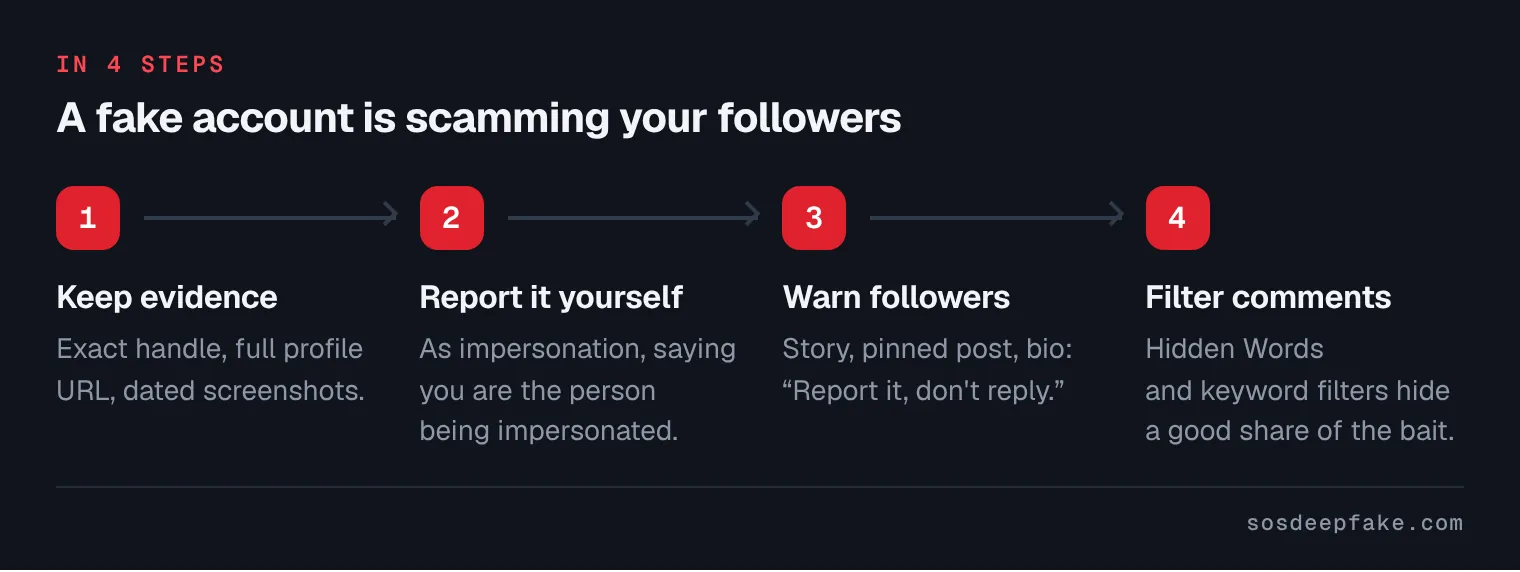
- Write down the exact handle of the fake account (often with an extra dot, underscore or doubled letter) and the full profile URL. The display name can change; the URL stays.
- Take dated screenshots of the profile, its posts and its comments under your posts. Ask followers who were contacted to send you screenshots of the conversation (account name visible, date, messages, payment link or crypto address). Our guide on saving evidence before reporting explains how.
- Report the account as impersonation and say that you are the person being impersonated. The exact steps depend on the network: Instagram, TikTok, Facebook, X (Twitter), WhatsApp. For an overview, see fake profile: what to do.
- Say in your report that the account is scamming people, and attach one or two screenshots of the messages. Impersonation used to ask for money is more than a simple fake profile.
- Don't message the fake account or threaten it: it could block your followers, change its name or wipe its tracks.
3. Warn your community right away
Reports take time. Meanwhile, your followers keep receiving messages. Your word is their best protection.
- Post a story as soon as you hear about it, and keep it as a highlight while the fake account is active.
- Pin a post to the top of your profile. Instagram lets you pin up to 3 posts; most networks have a similar feature.
- Add a line to your bio, for example: "I will never DM you to ask for money. My only account: @yourname."
- Don't share the fake account's link or tag it: describe it ("an account with my photo and a dot in the name") so it gets no extra reach.
- Use your other channels too: newsletter, YouTube channel, student or client group. Scammers often target people who started following you recently.
Short example message: "⚠️ A fake account is using my photo and a name almost identical to mine. It sends DMs announcing fake winnings and asking for money. It's not me. I never ask for payment by DM, I never run paid giveaways, and I have only one account: @yourname. Don't reply, don't click any link, report it and block it."
More templates (story, post, reply to a worried follower, message for your team) are in our guide on how to warn your followers about a fake account.
4. Ask followers to report, but report it yourself too
Followers' reports help, but not every platform gives them the same weight. Here is what their own help pages say.
- Instagram: anyone can report an account from the app. However, Instagram's impersonation form states that Meta can only act on reports from the person being impersonated or their authorized representative (for example, a parent), with a photo of their ID. So your own report is the one that counts.
- Facebook: from the profile, "Report", then follow the impersonation instructions. There is a form for people without a Facebook account.
- X (Twitter): the person impersonated or their representative uses the impersonation form; others can flag the account "as a bystander" from its profile. X says you don't need an X account to report impersonation.
- YouTube: the impersonation policy lets you report a channel impersonating "yours or another creator's channel" through a dedicated form. It also covers names changed by a typo or followed by words such as "Official" or "Backup".
- TikTok: anyone can report an account from its profile, and TikTok has an online impersonation form (see our TikTok guide).
What to ask your followers: report the account (and the message, if it came by DM), block it, don't reply, and never send money, a code received by text message or a photo of their ID. There's no point in a "mass report": one report on the right grounds with evidence counts for more than hundreds of reports without detail.
6. Verification badges: useful, under conditions
A badge helps followers recognize the real account. Conditions change often, so check the official pages before you apply.
- Instagram and Facebook: Meta offers a paid subscription for creators (Meta Verified) that gives a badge after checking your identity, with an ID that must match your profile name. Meta says it includes proactive monitoring for accounts pretending to be you. Eligibility requirements are in Instagram's Help Center.
- X: the blue checkmark means an X Premium subscription plus eligibility criteria, but X states that it does not mean the account has been ID verified. ID verification is offered separately, as an option.
- TikTok: TikTok says a badge means the account belongs to the person it represents, and looks at criteria such as whether the account is authentic, unique and active. You can submit a verification request.
- YouTube: the badge generally requires 100,000 subscribers, an authentic and complete channel, and 2-Step Verification on the Google account (YouTube Studio, channel settings).
A badge doesn't stop impersonation: it only helps followers tell the difference. Remind them to check the exact handle, not just the photo.
7. A follower paid: how to help
You didn't run the scam, and the fraud victim is the follower, so they are the one who needs to act. Here is what to tell them.
- Call their bank right away to try to stop or reverse the payment. If card details were given, the card should be blocked too. A payment the victim approved themselves is not automatically refunded.
- Report it to the police or the national fraud-reporting service. In the US, use the FBI's ic3.gov. In England, Wales and Northern Ireland, use Report Fraud; in Scotland, Police Scotland on 101. In Ireland, report it first to the local Garda station.
- Beware of "recovery" offers: after a scam, other accounts promise to get the money back for a fee. That's a second scam (see scam: fake content removal services).
On your side:
- Don't refund people yourself and never ask for a transfer "to sort things out": it muddies the evidence and it isn't your role.
- Keep everything: screenshots sent by followers, dates, account URLs. They show you had nothing to do with the scam.
- You can report it to the police too, as impersonation. A police report lets investigators ask the platform who runs the account: the platform won't tell you directly.
- If the fake account poses as your customer service, email your real customers and remind them of the only payment methods you use.
8. The fake account keeps coming back
A deleted account is often replaced by another, with one more dot or one letter less. It's common, and the answer is consistency.
- Keep a log: handle, date found, date reported, reference, answer. It saves time with every new account.
- Report each new account, saying it's a new copy of an account already removed, with the earlier report reference.
- Keep the line in your bio and the pinned post: that's your permanent protection.
- Keep your filters up to date with new variants of your handle.
- Use the DSA if the platform doesn't act (services offered in the EU): Article 16 of the Digital Services Act requires hosting services to offer a mechanism for notifying illegal content, and Article 23 says platforms must suspend, after a warning, users who frequently provide manifestly illegal content. Our takedown request template gives you the wording.
- File a police report if it goes on: only an investigation can trace the person behind the accounts.
9. What the law says
Every major platform bans impersonation, so a well-made report usually works without going to court. The legal side depends on where you live. Using a false identity to get money from someone is fraud in most countries. In the US, several states, including California (Penal Code § 528.5), have online impersonation laws. In the EU, the Digital Services Act requires a notice mechanism (Article 16), a reasoned decision (Article 17) and an internal appeal (Article 20). This page is general information, not legal advice: for your own case, talk to a lawyer or the police. More in online impersonation: what to do.
What we do for you
If fake accounts keep coming back, or show up on several networks at once, our fake profile and impersonation removal service takes over: we search for accounts using your name and photos, report them on the right grounds with the evidence platforms ask for, and follow up until the platform answers. With the Online Shield, we then keep watch: every day, automated checks. Every week, a full check-up of your online presence. As soon as we find something, we act. Our team and our AI technology search, document, report and follow up, with formidable efficiency. Every report is checked before it is sent. Are you a creator, coach, trainer or expert? See also our page for professionals in the public eye. We can't refund your followers or identify the person behind the accounts: that is for banks and the courts. No result is guaranteed, as the final decision belongs to the platform. Fixed price, refunded if no action is possible: see our pricing page. Private content leaking, or a fake account scamming people you know, right now? See our Emergency Response.
If a minor is involved or in danger, see help for under-18s. In an emergency, call 911 (US), 999 (UK and Ireland) or 112.
Verified by Léo, founder of SOS Deepfake.
See pricingFAQ
Am I responsible if my followers get scammed by a fake account in my name?
Can my followers get the fake account removed for me?
How many reports does it take to remove a fake account?
Should I get a verification badge?
The fake account was removed, then came back. What now?
Sources
- Instagram, "Report an impersonation account on Instagram or Threads" form
- Instagram, "Report an impersonation account"
- Instagram, Hidden Words
- Instagram, "Pin a post to the top of your profile"
- Instagram, eligibility requirements for Meta Verified creator subscriptions
- Meta, "About the verified badge for Meta One subscribers"
- Facebook, report an account pretending to be you
- X, "Report impersonation accounts"
- X, "About X verified accounts"
- YouTube, impersonation policy
- YouTube, manage and moderate comments (blocked words, links)
- YouTube, channel verification badge
- TikTok Newsroom, "New tools to promote kindness" (comment filters)
- TikTok Newsroom, "How to tell if an account is verified on TikTok"
- FBI Internet Crime Complaint Center
- Report Fraud (England, Wales and Northern Ireland)
- An Garda Síochána, "Fraud"
- California Penal Code § 528.5
- Regulation (EU) 2022/2065 (Digital Services Act), Articles 16, 17, 20 and 23