



On this page
1. When to warn people: now, alongside your report
Do three things in parallel, in this order:
- Save evidence: the fake account's exact handle, the full profile URL, dated screenshots of the profile and of the messages it sends. Our checklist: save evidence before reporting.
- Report the fake account to the platform as impersonation (section 7).
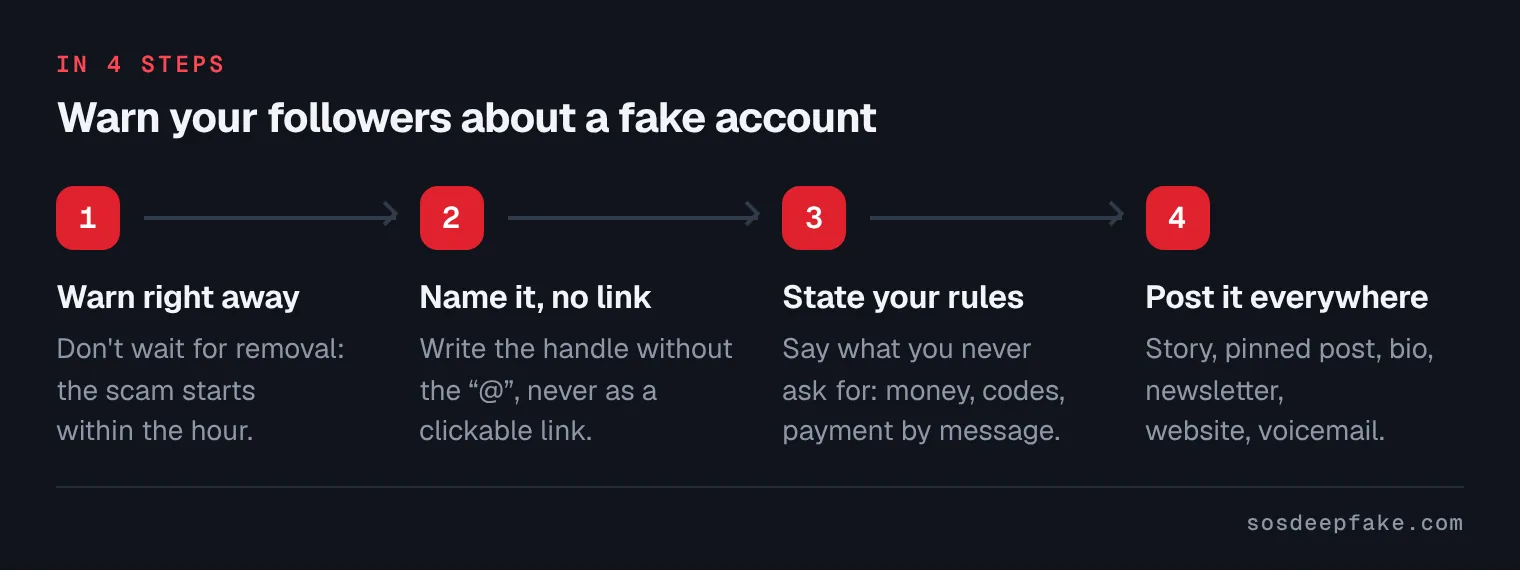
- Warn your audience without waiting for the platform's answer.
If the fake account has already taken money from followers, also read a fake account is scamming your followers, which covers how to respond to the scam itself.
2. Where to warn people: the right channel for each audience
| Channel | Who it reaches | Template |
|---|---|---|
| Story or status | Followers who see you every day | 1 |
| Pinned post at the top of your profile (on LinkedIn: the Featured section) | Anyone who lands on your profile, including from the fake one | 2 |
| Profile bio | Visitors comparing two accounts | 3 |
| Direct message reply | Followers asking "is this you?" | 4 |
| Pinned comment under your latest posts | Commenters, a favorite target of fake accounts | 5 |
| One-to-one message | People who already paid | 6 |
| Email, newsletter, website banner | Customers of a business or practice | 7 |
| Google Business Profile post ("Updates") | People looking up your business on Google | 7, short version |
| Notice at reception or in the waiting room | Patients, walk-in customers | 8 |
| Voicemail greeting | People calling to check | 9 |
Google says Business Profile posts (updates, offers, events) appear on Search and Maps, and that posts older than six months are archived unless a date range is set.
3. Five rules for a good warning
- Short and calm. No all-caps, no drama: you want people to believe you, not panic.
- The fake account's exact name, with no clickable link. Write the handle without the "@" (on most networks, "@" creates a link to the account) or show a screenshot with its photo blurred.
- What you never ask for: money, bank transfers, gift cards, crypto, codes sent by text, card details or health information by private message.
- Where to check: one reliable place that lists your official accounts and contacts, usually your website.
- What to do: don't reply, don't pay, report, block.
4. Ready-to-copy templates
Fill in the brackets. Keep the tone consistent: your followers should recognize the way you write.
Template 1 — Story (one line)
Template 2 — Pinned post
Template 3 — Profile bio
Template 4 — Reply to "Is this you?"
Template 5 — Pinned comment
Template 6 — To people who already paid
This message promises no refund and gives no legal advice: it points people to those who can act.
Template 7 — Email or newsletter to a business's customers
Short version for a Google Business Profile update or a website banner: "A fake [platform] account is using our name. Our only official contacts are the ones on this page. We never ask for payment by private message."
Template 8 — Notice for a medical practice's reception or waiting room
Patient confidentiality: the notice names no patient, no situation and no number of people affected. If a patient tells you they were contacted or paid, reply to them privately, and never post a screenshot of your exchanges with them.
Template 9 — Voicemail greeting
Template 10 — Short version for any network
5. What not to do
- Post a clickable link to the fake account: you send it traffic. The written name or a blurred screenshot is enough. Send the link privately to people who want to report it.
- Insult or threaten the person behind it, publicly or privately: it won't get the account closed and can backfire.
- Promise refunds to victims: it isn't your job, and a public promise attracts other scammers posing as "the refund service."
- Share victims' details: no names, amounts, chat screenshots or contact details, even to "prove" the scam.
- Ask followers to swarm or harass the fake account: a report is enough.
- Send ID to anyone claiming to be platform "support": use the official form only.
6. Get followers to report, and track the effect
Ask your audience to report, but don't rely on them alone: your own report matters most. Here is what the official pages say.
| Platform | What the help pages say |
|---|---|
| Instagram's impersonation form says it can only act on reports from the person being impersonated or their authorized representative (parent, legal guardian). Followers can report, but your own report is essential. | |
| The Help Center describes the steps for the person being impersonated (on the profile, "Report," then follow the impersonation instructions) and suggests asking friends for the link to the fake profile. It doesn't say how much weight third-party reports carry. | |
| X | X says that anyone who believes an account is misusing someone else's identity can flag it as a bystander from the account's profile. |
| YouTube | YouTube says that if you feel your channel or another creator's channel is being impersonated, you can report the channel. |
| TikTok | The Community Guidelines ban accounts that pose as a real person without disclosing it. Report it yourself as well as asking followers to. |
| Members can report a profile from its "More" menu. Report it yourself as well as asking followers to. |
To track the effect, keep a simple log: date, platform, fake handle, your report reference numbers, the answers you get, and how many people asked "is this you?". Keep only what's useful: no victim details beyond what the police or the platform ask for. Once the account is gone, update your pinned post ("the fake account has been removed, stay alert") and keep the bio line for a few weeks: fake accounts sometimes come back under a new name.
7. Get the fake account taken down
Warning people doesn't replace reporting. Our platform guides: fake Instagram account, fake TikTok account, fake Facebook account, fake LinkedIn profile, fake X account. If your face is used in a scam ad: my face in a scam ad. If it's your company's name or logo: brand impersonation.
8. What the law says
Platform rules ban impersonation, so a well-made report often works without going to court. The legal side depends on where you live. In the US, several states, including California (Penal Code § 528.5), have online impersonation laws, and using a fake identity to get money is fraud. This page is general information, not legal advice: for your own case, talk to a lawyer or the police.
What we do for you
While you warn your audience, our fake profile and impersonation removal service can handle the rest: we look for fake accounts using your name, report them on the right grounds with the documents platforms ask for, and follow up until the platform answers. For a business whose name or logo is copied, see also brand protection. Creators, healthcare professionals, experts: our page For visible professionals explains how we support people in the public eye. After that, the Online Shield takes over. Every day, an automated check. Every week, a full check-up of your online presence. The moment we find something, we act. Our team and our AI technology search, document, report and follow up, with formidable efficiency. Every report is checked before it is sent. We cannot recover money victims paid or identify the person behind the account, and no result is guaranteed: the final decision belongs to the platform. Fixed price, refunded if no action is possible: see our pricing page. Private content leaking, or a fake account scamming people you know, right now? See our Emergency Response.
If a minor is involved or in danger, see help for under-18s. In an emergency, call 911 (US), 999 (UK and Ireland) or 112.
Verified by Léo, founder of SOS Deepfake.
See pricingFAQ
How long should I leave the warning up?
Followers paid the scammer. Do I have to refund them?
Sources
- Instagram, impersonation report form
- Instagram, "Report an account pretending to be me"
- Facebook, "Report an account pretending to be me"
- X Help Center, "Report impersonation accounts" (bystander reports)
- YouTube, impersonation policy
- TikTok Community Guidelines, integrity and authenticity
- Google Business Profile Help, "Create posts"
- FBI Internet Crime Complaint Center
- Report Fraud (England, Wales and Northern Ireland)
- California Penal Code § 528.5